One of the features of Quicken which I've grown to love is its "Cash Flow Comparison" reporting. In particular, I get a kick out of seeing how our spending in various categories changes over time.
Generating a Quicken report for this — one which shows your categorized spending broken down into, say, a monthly basis — isn't tough at all. And because Quicken lets you easily export the data to an Excel-readable format, your ability to crunch numbers is limited only by the amount of free time you have to kill doing it.
Ahem.Getting a suitable monthly-spending comparison starts, as you'd expect, with Quicken's "Reports" menu in the toolbar. (I'm using Quicken 2008 Deluxe [
my review] here, by the way.) From the toolbar, follow the menu tree like so:
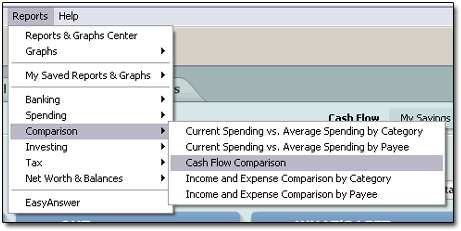
... choosing REPORTS → COMPARISON → CASH FLOW COMPARISON.
This brings up Quicken's default spending comparison report, "Cash Flow Comparison - YTD." It shows
all your income and spending for the current year, categorized nicely, annualized and compared against last year's spending.
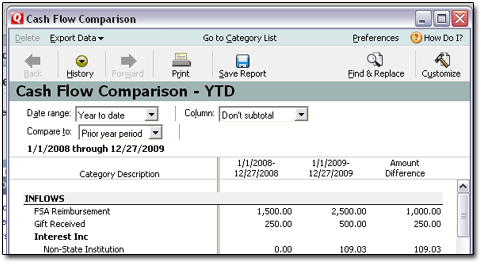
What if you wanted to see your spending in just one big category ... say, "Food," which in my case includes both groceries and dining out? You don't care about all the other stuff Quicken spits out.
Swing over to the CUSTOMIZE button on the right side. Click that. Then, in the window that appears, click the CATEGORIES tab. Click the CLEAR ALL button to reset your category-reporting selections. Now find the category or categories you want ("Food" in my case) and check-mark them.
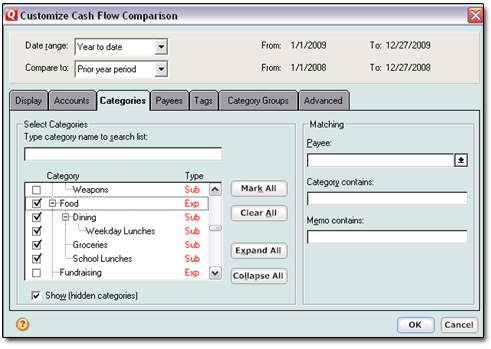
Then click the OK button at the bottom.
Now, since we want to see each month's food expenses for this year, and then compared to the same monthly periods from a year earlier, we need to change some of the drop-downs at the top of the report window. The changes to make are shown here with yellow arrows:
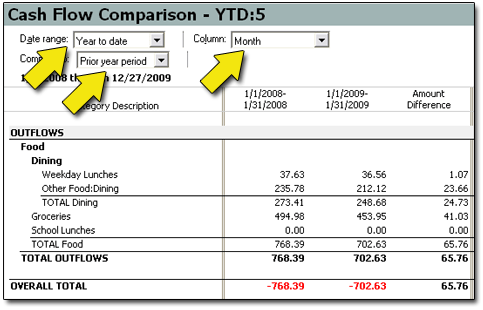
For "Date Range," we want "Year to date."
For "Compare to," select "Prior year period."
And for the "Column" option, select "Monthly."
After these changes, the Quicken spending report for category "Food," plus all subcategories, now shows two years' worth of our food expenses, broken down monthly. Each month of this year is compared to its year-ago period. (Note that such a report spans quite a bit of space to the right, as evidenced by the scroll bars Quicken offers at the bottom of the report window.)
While you've likely got all the data you're needing right there in the Quicken report itself, I tend to prefer to see such data in Excel. If your version of Quicken is at all recent, it's a small matter at this point to dump (or "export," if you're in polite company) the report into an Excel-readable format.
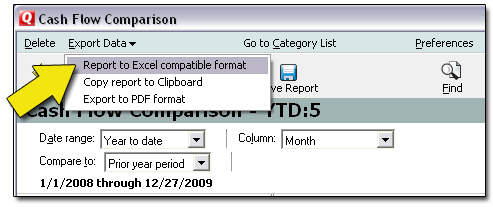
In the report menubar, select EXPORT DATA → EXPORT TO EXCEL COMPATIBLE FORMAT. Then tell Quicken where you want the text file (.txt) to be saved. (I'm a desktop kind of guy, myself.)
Now open Excel. In XL2007, click the colorful Office button, and then OPEN. In earlier versions, select FILE → OPEN.
In the OPEN window, under "FILES OF TYPE:" select the "ALL FILES (*.*)" option.
Now direct Excel to open the text file you created moments ago. Excel will automatically open its three-step, text-import wizard. The wizard then guides you through the stupid-easy process of bringing your delimited text file (.txt) into a much fancier, more-number-crunchier Excel file (.xls or .xlsx).
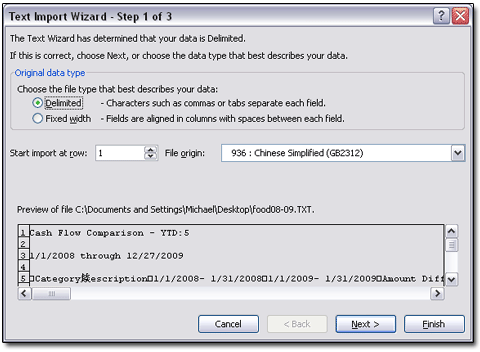
Set your columns and formatting, and otherwise play your cards right, and you'll have a chock-full-of-Quicken-data
Excel spreadsheet with numbers ready to be crunched six ways to Sunday!
Labels: Quicken, Tutorials
— Posted by Michael @ 8:10 AM
[Comments Closed on this Post]


Not that this is breaking news to readers here, but at least we have a sizeable media outlet stating the obvious — that stupid-low interest rates mean savers get to pay for banks' mistakes:
NY Times: At Tiny Rates, Saving Costs MoneyIf you haven't figured it out by now, you and I as Designated Savers get to subsidize the spend-happy folks (and the banks who lend to them, and the financial system that craters without them...) pretty much in perpetuity. I rather appreciate this comment from PIMCO's Bill Gross, explaining things oh-so-well:
“What the average citizen doesn’t explicitly understand is that a significant part of the government’s plan to repair the financial system and the economy is to pay savers nothing and allow damaged financial institutions to earn a nice, guaranteed spread,” said William H. Gross, co-chief investment officer of the Pacific Investment Management Company, or Pimco. “It’s capitalism, I guess, but it’s not to be applauded.”
Mr. Gross said he read his monthly portfolio statement twice because he could not believe that the line “Yield on cash” was 0.01 percent. At that rate, he said, it would take him 6,932 years to double his money.
And don't we savers know it. I mean, Mr. Gross ought to at least get acquainted with ING Direct.

We go on to learn that (SURPRISE SURPRISE) low interest rates are particularly painful for seniors. Why? Because so many of them are on fixed, safe-investment-based incomes:
Eileen Lurie, 75, is taking out a reverse mortgage to help offset the decline in returns on her investments tied to interest rates. Reverse mortgages have a checkered reputation, but Ms. Lurie said her bank was going out of its way to explain the product to her.
“These banks don’t want to be held responsible for thousands of seniors standing in bread lines,” she said.
Ms. Lurie needs to wake up and smell the Starbucks Holiday Blend.
Firstly, were I the reporter on this story, I'd have to ask Ms. Lurie, "Exactly who is it that's paying you those on-the-floor savings rates, thereby forcing you to reverse-mortgage your home equity to them, thereby (again) generating some sweet banking monthly fee income?"
(Answer: the banks)Secondly, I've formed the opinion that if your nearest Really Big Bank and/or Bank Holding Company could find a way to book record profits and earn management bonuses simply by putting seniors in bread lines, they'd do it. And a millisecond later they'd leverage-up their bets at 37-to-1, utilizing some variety of "Seniors in Bread Lines" default-swap derivative.
("Jenkins!" yells the Goldman Sachs guy who's reading this. "We need some financial innovation over here — STAT!")
I dunno. Ms. Lurie seems pretty naive. Perhaps we could arrange for her to make a social call with the Rickmans, late of Denver:
Denver Post: Credit-Card Squeeze Angers Elderly CoupleOur geriatric anti-heros, the Rickmans, are mighty miffed at Bank of America.
[Rickman] is 81 now, seven years his wife's senior. They have had a Bank of America credit card for 20 years. They never once in all that time, both say in near unison, missed a payment.
Rickman slides his December bill across the table, with instructions to read it. No, not all of that, he spits, a Pall Mall cigarette hanging on one side of his mouth. Look at the interest rate, he says.
Sixteen-point-nine percent, it reads.
"I was paying 5.9 percent, which is what I have paid for years," he says. "I always paid them $500 a month without complaint. Now, they want $1,074 this month. I can't pay it. I won't pay it."
That's his prerogative, certainly. Whilst it is, admittedly, a bit late, I do have a simple yet valuable Life Equation for Mr. Rickman:

It should go without saying that when card companies see their ability to do "Whatever the f__k they want" to their customers being limited at some specific time in the near future, as they do with the CARD Act, then they will all immediately rush to do "Whatever the f__k they can" to their customers immediately, if not sooner.
This idea of banks frontrunning upcoming regulations ain't rocket science. Really. I'd say "It's so simple, even a congressman could figure it out," but a cursory glance at today's headlines would prove it's not quite
that simple, apparently.
Ah well. Let's see what this week's news cycle brings...
Labels: Debt, Saving
— Posted by Michael @ 8:20 AM
[Comments Closed on this Post]

I recently got into a heavy discussion with someone on a message board regarding house prices in my home state of Oklahoma. His contention, having lived here earlier in his life, was that homes in Oklahoma were FAR overpriced relative to their true values — that the "median home price / median income" multiple here was at 10x or more. My argument was that this was not the case, and that home values here weren't far outside any affordability metrics of which I was aware.
Historically, I've been told, home prices tend to fluctuate in a range of 3 to 5 times an area's median household income. Here's an article that discusses that ratio:
newgeography.com: Improving Housing AffordabilityIn it, we're told:
Our measure of housing affordability is the “Median Multiple,” which is the annual pre-tax median house price divided by the median household income. Over the decades since World War II, this measure has typically been 3.0 or below in all of the surveyed nations and virtually all of their metropolitan areas, until at least the mid-1990s. There were bubbles before that time in some markets, but during the “troughs” most markets returned to the 3.0 or below norm.
So where does this put Oklahoma?
Well, according to the U.S. Trustee Program / Department of Justice, Oklahoma's median income for a one-person/one-earner household is
$38,244 (as of May 2009). (Such figures would be applicable to bankruptcy courts, and regularly updated, obviously, since how a BK filer's income compares to his/her state's median income forms a primary basis for how the debts are treated in court.)
Census.gov shows Oklahoma's median income, as of 2005, to have been
$39,292, though we don't know if this was for one-, two-, or more-earner households ... or for some combination thereof.
Now for home sales: According to Housingtracker.net, the median
listing price for Oklahoma City homes (they don't show a statewide figure) as of December 21 was
$157,900.
For a second source, MLS shows Oklahoma's median home
sales price to be
$122.5k as of October 2009.
So if we divide the MLS median sales price ($122,500) by the DOJ's median income figure ($38,244), we get a housing-price ratio of
3.2 for Oklahoma. This is well within historical norms, and certainly FAR away from the 10x ratio my fellow poster was suggesting.
(For those interested, the same calculations would put California at a ratio of 5.2, utilizing a median income of
$48,140 and a median home sales price of
$250k.)
Labels: Homeownership, Mortgages
— Posted by Michael @ 8:15 AM
[Comments Closed on this Post]

Confession: I loves me some warm drinks in the wintertime. Coffee, tea, hot buttered rum ... you name it, and I'll drink it.
But there's one winter drink that, for me, rules them all.
When I was a kid, my mom always made this wonderful orange spice tea around the holidays. Later, when my wife and I got together, I managed to cajole the recipe from my mom. Today, this tea's strong orange-and-cinnamon smell, and its lemonade-y zing, inevitably bring back my most vivid holiday memories. (The spiced rum is
my recent addition, by the way. Sometimes good stuff happens when you ask, "What if?")
In any case, this tea is truly
my personal Nectar of the Gods.
Wintertime without it? Bah.
Just wouldn't be right!
Mom's Orange Spice Tea [Makes one big batch]
3/4 cup instant tea mix
2 cups Tang orange drink mix
1 cup Country Time lemonade drink mix
1/2 teaspoon ground cinnamon
1 splash Captain Morgan spiced rum (optional)
Mix instant tea, Tang, Country Time, and cinnamon in a bowl. Transfer to an airtight container for storage. When ready to serve, add roughly 3 or 4 tablespoons of the mix to each mug of hot water. Add splash of spiced rum if desired. Enjoy.And for those who'd prefer to mix it one serving at a time, or just want to give it a try:
Mom's Orange Spice Tea [Makes one 8-10oz. serving]
2 teaspoons instant tea mix
4 teaspoons Tang orange drink mix
2 teaspoons Country Time lemonade drink mix
1 sprinkle ground cinnamon
1 splash Captain Morgan spiced rum (optional)
Mix instant tea, Tang, and Country Time in mug. Add 8-10oz. boiling water. Add spiced rum. Sprinkle ground cinnamon on top. Enjoy.For those of you who aren't fans of spiced rum, I imagine Grand Marnier would go very well with this tea, too, though I haven't tried it.
Note, please, that I like my tea to have some
ZING, and the ingredient amounts above reflect that — especially in the single-cup recipe. So feel free to experiment with them to find a combo that works for you!
Labels: Recipes
— Posted by Michael @ 8:20 AM
[Comments Closed on this Post]

You'd think, from watching all the coverage that "holiday living" gets on the news shows, that someone somewhere would talk about the proper way to save for Christmas.
But no. All I see is advice on how to
spend for Christmas.
In my opinion, the money gurus universally miss the boat here, and I'm not sure why. Not a one of them that I've seen talks about
saving up for Christmas throughout the year.Even my guy Dave Ramsey, in a cliché-drenched appearance on
Good Morning America last week, advised GMA's financially-stressed viewership that the proper way to handle Christmas expenses was to "spend cash."
"When you go shopping for Christmas gifts, take along an envelope with cash in it," he said. "When the cash is gone, go home."
Well, yeah. Okay.
The GMA host, of course, gushed at the "Why didn't I think of that?" brilliance of this idea, at its cleverness and — dare I say — mono-syllabic zing. She treated this utterance from Dave as sheer genius.
I, on the other hand, threw up just a little.
For Joe and Jane Sixpack, where, pray tell, will this cash come from?
This whole "spend cash" mantra implies that most people can cash-flow their Christmas expenses simply by allocating some portion of their December income to it. Pardon me for being slightly dubious here, especially when recent surveys suggest that 61 percent of us live
paycheck-to-paycheck.
I say the cash-flow thing is "implied" because NO ONE specifically refers to the process by which folks could GUARANTEE that they have COLD HARD CASH saved up and ready to cover all their holiday gift-giving needs. I mean, I know it's difficult to turn down offers like this...
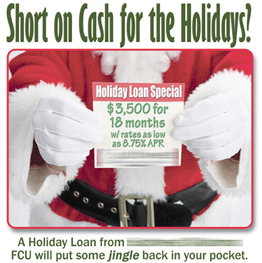
... so that when Christmas 2010 rolls around, you'll still be six months short of paying for Christmas 2009.
(Wanna guess why the credit union above shows
that ad rather than one for their "Christmas Club" savings account? Gee, I can't imagine.)
The saving process I'm talking about is what
Mary Hunt refers to as
Freedom Accounting. And if you're one of those crazy people who wants to avoid going into debt for Christmas — why do you hate America, anyway? — then it is like gold.
I wrote the following in last year's
Saving for Christmas post:
Barring some really staggering developments, Christmas is going to happen next year, too, on December 25. If your Christmas, like mine, involves spending money, then you should be preparing for this right now.
Here's what I've figured out: During recent years, my household has spent roughly $1k per year on gifts. This includes Christmas, birthdays, and other incidental gift-giving expenses. Therefore, I've made it an iron-clad habit to set aside $80 per month for just this purpose. (Well, this gets me to $960, which is close enough for our needs.)
That's the secret: Treat your gift-giving as a bill, like any other, and pay yourself for it (i.e., save up) in advance, every month. Keep this money in a separate savings account. Track it in Quicken, or in an Excel spreadsheet like
ExcelGeek's Freedom Account spreadsheet. Or live on the edge and create your own. Whatever method works for you ... well, do that.
Just do yourself a favor and start saving
now for Christmas 2010!
Labels: Budgeting, Saving
— Posted by Michael @ 8:17 AM
[Comments Closed on this Post]